Experience businesses win on delivery, not on spreadsheets.
53° brings CRM, deals, projects, proposals, bookings, search, and automations into one place so you can stop juggling tabs and start shipping unforgettable experiences.
Below, you’ll find a clean, skimmable guide to the core workflow upgrades that will save you hours every week—without sacrificing control.
Customise your deal pipeline to match how you sell
Your pipeline should reflect your real sales process.
In 53°, you can define clear stages, apply colours for instant recognition, and reorder as you evolve.
What this unlocks
Clarity at a glance: everyone understands where deals sit.
Faster reviews: drag cards between stages as conversations progress.
Better forecasts: mutually exclusive stages reduce confusion.
How to set it up
Go to Settings → Pipelines.
Add or edit stages (e.g. Prospect, Qualified, Meeting, Proposal, Negotiation).
Assign colours, drag to reorder, and save.
Pro tip: Keep stage definitions tight and limit the number of stages. Fewer steps = less friction and cleaner data.
Labels: lightweight structure that scales with you
Labels are flexible, colour‑coded tags for Contacts, Companies, Deals, and Tasks.
They turn messy lists into meaningful segments.
Where labels shine
Instant filtering: pull “Suppliers”, “VIP clients”, or “Hot Leads” in seconds.
Team consistency: shared categories mean shared context.
Cleaner reporting: a stable taxonomy keeps insights reliable.
Examples to start with
Contacts: Employee, Customer, Supplier, Partner
Companies: Vendor, Strategic, Agency, Enterprise
Deals: Hot Lead, Warm Lead, Cold Lead, VIP
Tasks: Sales, Support, Finance, Urgent
Create and maintain
Pro tip: Keep names short and unambiguous to avoid overlap.
Tasks that live where the work happens
Tasks are attached to contacts, companies, deals & projects—so context is never lost and nothing falls through the cracks.
Work faster from any profile
See all related tasks, filter by “assigned to me” or “all”.
Scan status, due dates, owners, labels, and stages.
Create and automate
Add tasks from profiles or the global Tasks button.
Use recurrence (daily, weekly, monthly, yearly) with optional end conditions.
Completing one occurrence automatically schedules the next.
Stay coordinated
Live‑edit fields, attach files, create subtasks with their own status.
Comments and @mentions notify teammates with deep links.
Personal tasks keep private to‑dos out of team views.
Pro tip: Combine labels and priorities for quick triage lists, and assign to the owner closest to the work.
Projects: organise bigger goals without heavy project management
When work spans multiple tasks and people, Projects keep everything tidy and transparent.
Choose the right visibility
Public: visible to everyone.
Private: invite‑only (plus business owner).
Personal: for your eyes only; all tasks are private.
Plan and track your way
Board view: Kanban‑style flow; drag tasks between stages.
List view: sortable, searchable details.
Activity logs: a reliable timeline of updates and changes.
Keep context close
Description with rich text for scope and notes.
Files for briefs, assets, and deliverables.
Members to add/remove collaborators and set a lead.
Pro tip: Use Board for momentum, List for detail work, and Logs for audits and handovers.
Command+K search: navigate at the speed of thought
Cut mouse travel. Open the launcher and jump anywhere.
Shortcuts
What you can do
Open Customers, Deals, Dashboard, or specific records by name/keyword.
Tweak settings like email notifications or theme without leaving the launcher.
Pro tip: Make the shortcut muscle memory and watch minutes turn into hours saved each week.
Automations: remove repetitive pipeline admin
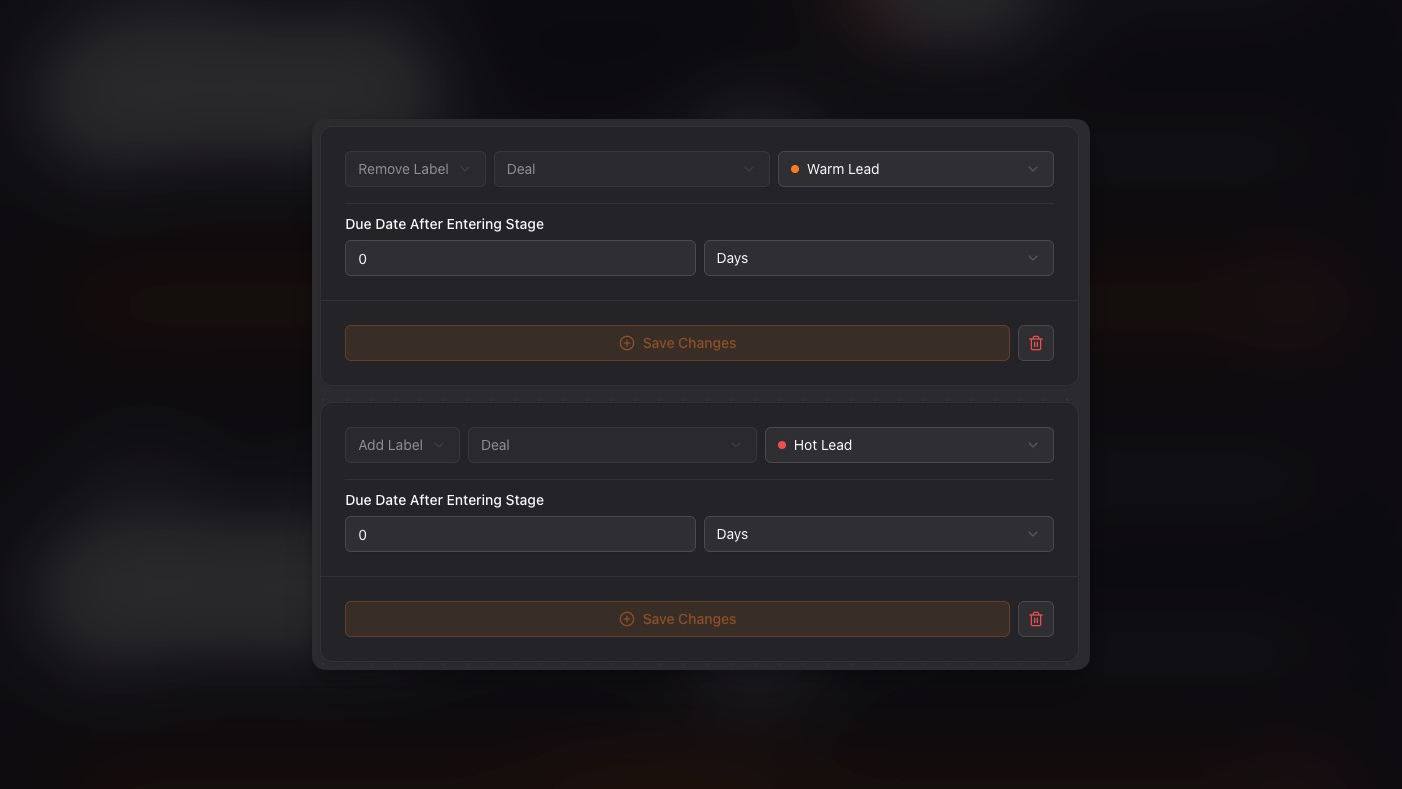
Turn stage changes into instant, reliable actions—no manual follow‑ups, no missed steps.
What to automate
A simple starter recipe
Why it matters
Consistency across every lead.
Faster cycles with fewer errors.
Better customer experience from timely, predictable touchpoints.
Pro tip: Chain small, specific automations per stage instead of one big “do‑everything” rule and add a short note in the task description.
A 15‑minute setup that pays off daily
If you’re new to 53°, try this quick win sequence:
Define 5–7 pipeline stages and assign colours.
Create core labels for Contacts, Companies, Deals, and Tasks.
Make one Public project for team goals and one Personal project for your private work.
Add a basic automation for your most common stage change.
Practise Command+K for a day—no mouse needed.
Run experiences, not admin
53° helps experience businesses win more group bookings, cut admin, save money, and keep customers coming back.
With pipelines that mirror reality, labels for instant organisation, tasks in context, projects for delivery, lightning‑fast search, and smart automations, you’ll spend less time on busywork and more time creating experiences your customers remember.


:quality(80))
:quality(80))
:quality(80))
:quality(80))